
There are users behind the zblog websiteApplication CenterWhen downloading a theme or plug-in, click Get App, always indicating that the APP download failed! What causes this situation?
Method 1 [Required test]: Check whether the website background application center is the latest version.
First of all, it must be clear that the application center is also a plug-in the background of the website. If the application center is not the latest version, it is usually impossible to download applications normally.
The way to check whether the Application Center is the latest version is:
Go to the Application Center-check for application updates. If the latest version of the Application Center plug-in appears, click Update Application.
This way, the application can be downloaded normally.
If you still can't download or plug-in, don't worry, we still have a solution.
Method 2 [Required Test]: Set the connection method of the application center.
Enter the Application Center and click the settings in the upper right corner to see the options for connecting to the "Application Center" in the background and the domain name options for accessing the "Application Center" in the background.
There are a total of six combinations of the two settings added up. You can try one by one. There is always one method that is suitable.
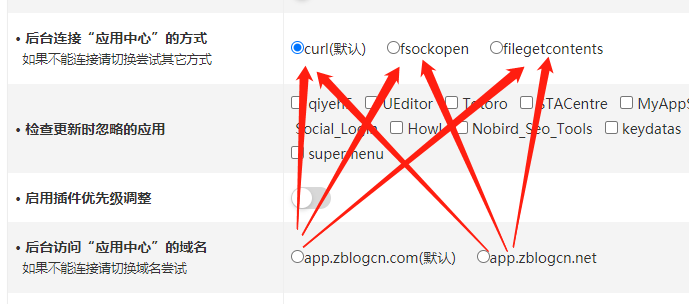
Users usually solve their problems here.
Why does the application center develop so many connection methods?
Because different users use different server environments, so many connection methods are needed in order to adapt to different server environments.
The APP download failed because the current connection method is not suitable for the user's current server environment.
However, some users said that he tried the above method but still couldn't download the application.
Method 3: Check directory permissions
The directories that need to check permissions mentioned here are the theme folder (/zb_users/theme/), the plug-in folder (/zb_users/plugin/), and the cache folder (/zb_users/cache/)
Normal permissions should be 755. If not, please manually set it to 755.
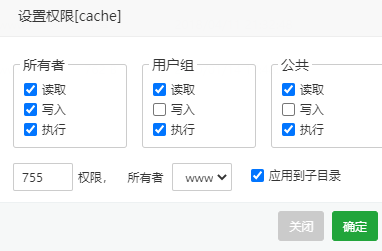
So, what is the reason that causes these directory permissions to have problems?
1. You may have turned on safe mode in the background.
After turning on safe mode, the permissions of the above three folders will be locked, and applications will no longer be downloaded and updated.
2. Security mode is enabled on the server side.
Check the settings on the server side to see if the permissions for the above three folders are disabled.
The folder permissions are restored to normal, and the problem of not being able to download the application is solved.
Of course, in addition to the above three methods, there is another possibility.
Method 4: Check the server-side traffic limit and attachment size limit
1. If the server-side website settings turn on traffic restriction and limits the traffic size per request to be less than the application size, the application cannot be downloaded normally.
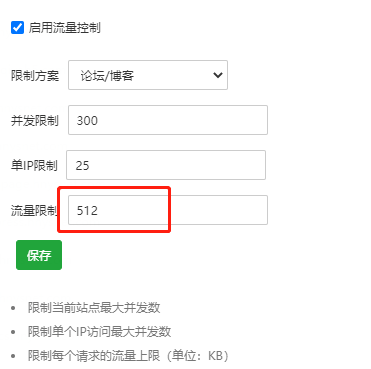
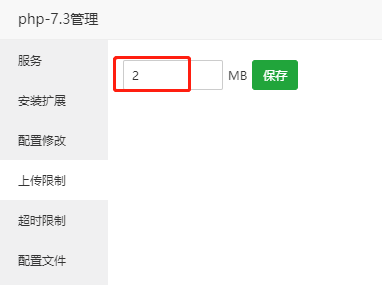
2. If the server-side php settings, upload restrictions, and set parameters are less than the application size, the application cannot be downloaded normally.









 Add customer service qq.
netizens commented