
jQueryThe library is no stranger to everyone, and refers to the jquery.js file referenced on the web page.
This is the first time many developers have heard of the ClipboardJS library. It refers to the clipboard.js file referenced by the web page.
You should reference the jquery.js file before referencing the clipboard.js file.
For example:
<script src="https://code.jquery.com/jquery-3.6.4.min.js"></script>
<script src="https://cdnjs.cloudflare.com/ajax/libs/clipboard.js/2.0.8/clipboard.min.js"></script>
The introduction of clipboard's official website is:
Copying text to the clipboard should not be difficult. It does not require dozens of steps to configure, nor does it require hundreds of KB to load. But most importantly, it should not rely on Flash or any bloated framework.
This is why clipboard.js exists.
That's why I chose clipboard.js.
So, in practical applications, how should the code be written?
For example, we are solving the following issues:
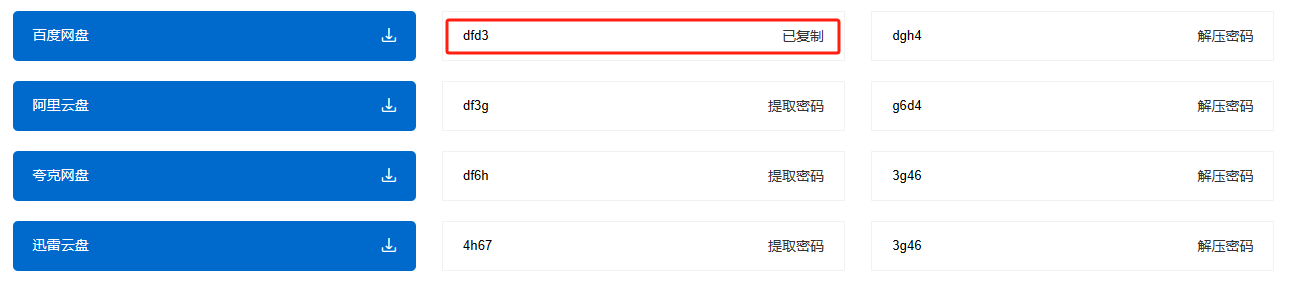
Click on the dl tag to copy the value of input in the dl tag subelement. After the copy is successful, it is prompted that it has been copied. The copied prompt text will be restored to the original content after 2 seconds.
HTML code
<ul class="list-down">
    <li class="BDown">
        <dl>
            <a href="#" title="百度网盘" rel="nofollow">
                <dt>百度网盘</dt>
            </a>
        </dl>
        <dl>
            <span>提取密码</span>
            <dt><input id="hn_Email" type="text" name="Email" value="dfd3"></dt>
        </dl>
        <dl>
            <span>解压密码</span>
            <dt><input id="hn_Email" type="text" name="Email" value="dgh4"></dt>
        </dl>
    </li>
    <li class="FDown">
        <dl>
            <a href="#" title="阿里云盘" rel="nofollow">
                <dt>阿里云盘</dt>
            </a>
        </dl>
        <dl>
            <span>提取密码</span>
            <dt><input id="hn_Email" type="text" name="Email" value="df3g"></dt>
        </dl>
        <dl>
            <span>解压密码</span>
            <dt><input id="hn_Email" type="text" name="Email" value="g6d4"></dt>
        </dl>
    </li>
    <li class="KDown">
        <dl>
            <a href="#" title="夸克网盘" rel="nofollow">
                <dt>夸克网盘</dt>
            </a>
        </dl>
        <dl>
            <span>提取密码</span>
            <dt><input id="hn_Email" type="text" name="Email" value="df6h"></dt>
        </dl>
        <dl>
            <span>解压密码</span>
            <dt><input id="hn_Email" type="text" name="Email" value="3g46"></dt>
        </dl>
    </li>
    <li class="FDown">
        <dl>
            <a href="#" title="迅雷云盘" rel="nofollow">
                <dt>迅雷云盘</dt>
            </a>
        </dl>
        <dl>
            <span>提取密码</span>
            <dt><input id="hn_Email" type="text" name="Email" value="4h67"></dt>
        </dl>
        <dl>
            <span>解压密码</span>
            <dt><input id="hn_Email" type="text" name="Email" value="3g46"></dt>
        </dl>
    </li>
</ul>
js code (placed after the reference to clipboard.js)
$(document).ready(function() {
  // 初始化ClipboardJS并选择要复制值的元素
  var clipboard = new ClipboardJS('.list-down dl', {
    // 获取要复制的文本
    text: function(trigger) {
      return $(trigger).find('input').val();
    }
  });

  // 处理<dl>元素的点击事件
  $('.list-down dl').on('click', function(e) {
    e.preventDefault(); // 阻止原生事件
    var spanElement = $(this).find('span');
    var originalText = spanElement.text();
    spanElement.text("'Copy'");
    setTimeout(function() {
      spanElement.text(originalText); // 还原<span>元素的内容
    }, 2000); // 2秒后还原内容
  });

  // 处理剪贴板成功事件
  clipboard.on('success', function(e) {
    console.log('复制成功!');
    e.clearSelection(); // 清除选中状态
  });

  // 处理剪贴板错误事件
  clipboard.on('error', function(e) {
    console.log('复制失败!');
  });
});
Front-end display effect
Finally, it is worth mentioning that clipboard.js has good compatibility with different browsers.




 Add customer service qq.
netizens commented