
Website openspseudo-staticMake it easier for search engines to include! When opening a pseudo-statically generated website url link, the rationality of its structure should also be considered.
The following is a URL configuration solution we have used for a long time that you can learn from or adopt.
If your website already has a large number of included pages, we do not recommend that you change the URL configuration.
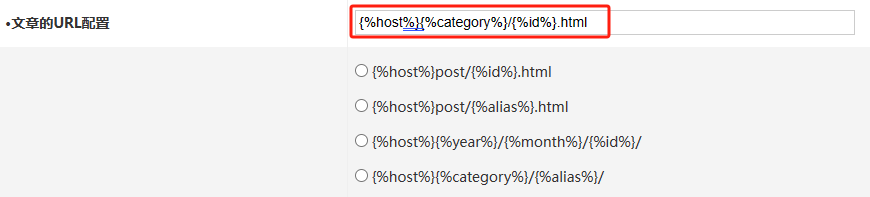
1. Article URL configuration
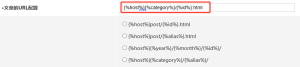
We recommend that you use: {%host%}{%category%}/{%id%}.html (URL + category (alias)+ article id+html). The following options are not available, and the generated URL link effect is like this:https://en.finchui.com/zbp-theme/36.html
2. Page URL configuration
We recommend that you use: {%host%}{%alias%}.html (URL + page alias +html), and the generated URL link effect is as follows:https://en.finchui.com/about.html

When using this solution, remember to set an alias for the page. If you don't set an alias, the URL connection will be directly displayed as the URL + page name.html
3. URL configuration of the home page
We recommend that you use: {%host%}index_{%page%}.html (URL +index_pages +html). The following options are not available. The generated URL link effect is like this:https://en.finchui.com/index_2.html

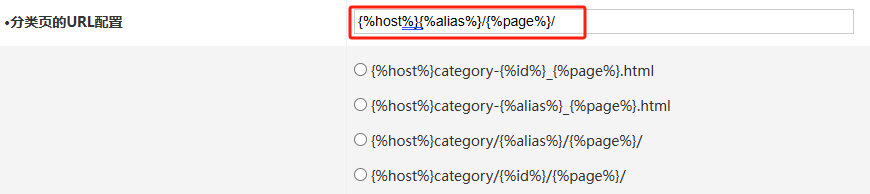
4. URL configuration of classification page
We recommend that you use: {%host%}{%alias%}/{%page%}/(URL + category alias + page number). The following options are not available. The generated URL link effect is like this:https://en.finchui.com/app/
Why isn't html used in this URL? Our goal is for website categories to appear as a separate subdirectory of the website, and the subdirectory has a separate weight in the website (similar to the static directory structure generated by cms sites).
5. URL configuration for tab pages
We recommend that you use: {%host%}tags/{%alias%}/{%page%}/(URL +tags+ tag aliases + page numbers). The generated URL link effect is as follows:https://en.finchui.com/tags/ZblogPHP/2/

6. URL configuration for date page
We recommend that you use: {%host%}date/{%date%}/{%page%}/(URL +date+ time + page number), and the generated URL link effect is as follows:https://en.finchui.com/date/2023-12-1/

7. URL configuration for author page
We recommend that you use: {%host%}author/{%alias%}/{%page%}/(URL +author+ author alias + page number). The generated URL link effect is as follows:https://en.finchui.com/author/finchui/2/










 Add customer service qq.
netizens commented