
FinchUI multilingual websiteThe plugin will save the body translation result to a local file. When encountering the same source text and target language again, the plugin will directly read the cache and no longer request a third-party translation interface.
Text translation cache directory: zb_users/cache/fui_multilang/exchange rate cache directory: zb_users/cache/fui_multilang_currency/
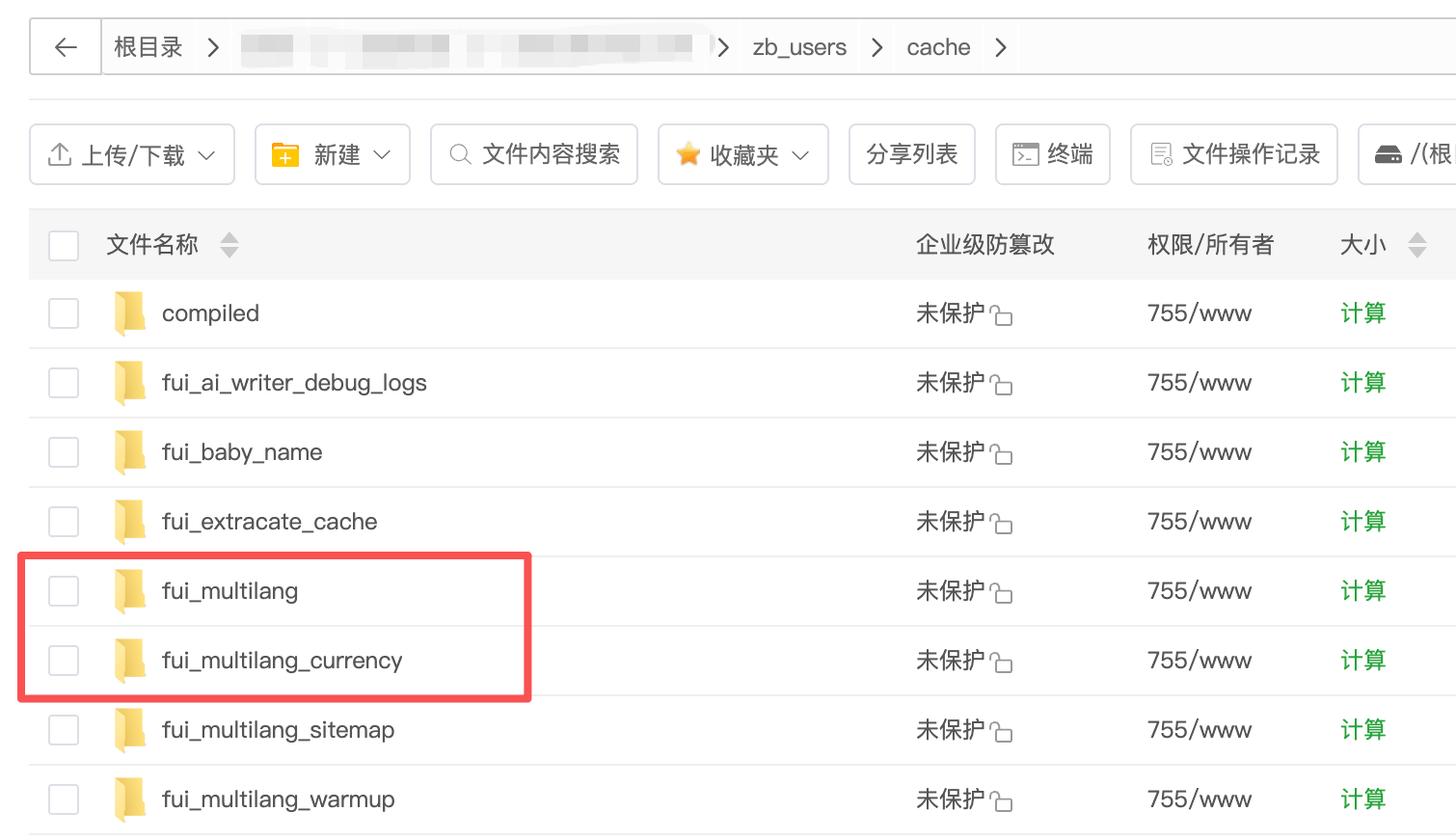
First, check whether the cache file is generated
After visiting a page with a non-default language enabled and text to be translated, view zb_users/cache/fui_multilang/. Directories are layered by target language and hash prefix, for example:
fui_multilang/
└── en/
    └── ab/
        └── cd/
            └── abcdef...json
Each of these .json files usually corresponds to a successfully translated piece of text, and the content of the file will contain the translation result:
{
  "time": 1780000000,
  "text": "Translated text"
}
After opening the page for the first time, a new JSON file appears, indicating that the translation result has been successfully written to the cache.
Verify by visiting the same page twice
- Clean the translation cache in the plugin background.
- Record the number of requests or character consumption in the background of the translation service provider.
- Visit a page with Chinese text in a non-default language, such as English.
- Confirm that the JSON file is added to the cache directory, and record the usage of the translation service provider again.
- Visit the exact same page again.
Expected Result: The second visit should hit the local cache directly; the translation service provider's request volume or character consumption should not continue to grow without changing the page content, target language, and cache validity period.
III. How to understand a blank hash directory
The current version only creates a two-level hash directory when a translation is successfully obtained, or when a short-term translation failure state needs to be recorded, so the newly generated hash directory should contain the corresponding JSON file.
- Cache reads, cache miss checks, and first page fragment pre-scans only calculate file paths and do not create language or hash directories.
- After the translation interface returns a non-empty translation, the plugin writes the body translation JSON file.
- When the actual request of the translation interface fails, the plugin will write to the short-term .fail.json failure cache to temporarily avoid repeated requests; the file will automatically retry when it expires.
- Empty directories left over from older versions do not affect cache hits and do not indicate successful caching.
Empty directories that already existed before the upgrade can be kept or cleaned up when it is confirmed that there are no cache write requests; after the upgrade, normal access should not continue to add empty hash directories due to cache misses or fragment caps. Short-term failure cache files are written when the interface actually fails, rather than leaving empty directories.
IV. What situations require further investigation?
If the empty directory continues to increase rapidly, but the corresponding language page never generates a JSON file, or if the same page continues to increase the usage of translation service providers every time it is visited, you should check:
- The translation interface key, region, and signature are configured correctly.
- The translation interface in the background of the plugin tests whether it is successful.
- Whether the server can access the translation service provider interface.
- Whether the text to be translated on the page exceeds the upper limit of the single-page translation fragment set in the background.
- Whether the cache directory and its parent directory have PHP process writable permissions.
- Whether the cache valid period is set too short or is manually cleaned frequently.
Cache valid period and file time
The cache valid period is controlled by the "Translation Cache Days" in the background, and the default value is 30 days. Cached files that exceed the valid period will be invalidated and deleted during subsequent reading or random cleaning; the translation interface will be called again the next time the text is needed.
When the cache hits, the plugin refreshes the file modification time at most every 6 hours. Therefore, it is normal to visit the same page continuously for a short period of time, and the modification time of the JSON file remains unchanged.
Tip: If you only need to clean the empty directory, you can process it after confirming that there is no request being written to the cache; but "cleaning the translation cache" through the plugin background will also clean the valid JSON cache, and then the translation request will be generated again when visiting the page.





 Add customer service qq.
netizens commented