
Recently, I saw everyone discussing in the zblog developer group. Some people used the reason to help users check the website's backstage. They entered the user's website's backstage, stole the themes and plug-ins paid by the user, and cracked and released pirated sales.
What about piracy? Needless to say, the author who is hateful and passionate about original works cares about piracy for eight generations!
When I saw some forums, someone posted pirated content, and then there were a bunch of people following the comments,"The moderator is powerful... the moderator is great!" It's so fucking disgusting!
Piracy not only harms the interests of authors, but also harms the interests of users. Imagine if the author's works are pirated, affecting sales and losing financial support, will he continue to eagerly update his works?
Similarly, people don't want the themes or plug-ins they spend money to be stolen from the background of the website, do they?
So, if you really need someone to provide technical support and log in to the background to check your website, what should you do?
Below, whether you use FTP or the control panel on the server, find the directory where the zblog website program plug-in is located, the path is as follows:
Website root directory/zb_users/plugin/
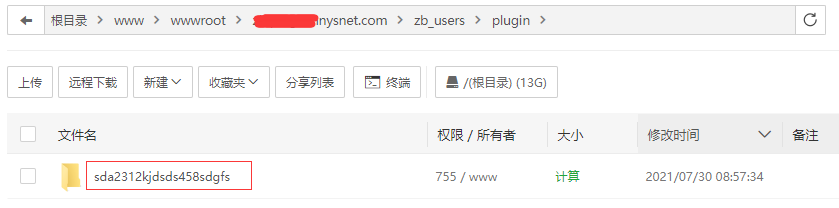
In the plugin folder, create a new folder and name it whatever you want, for example: sda2312 kjdsds458sdgfs
As shown in the following figure:
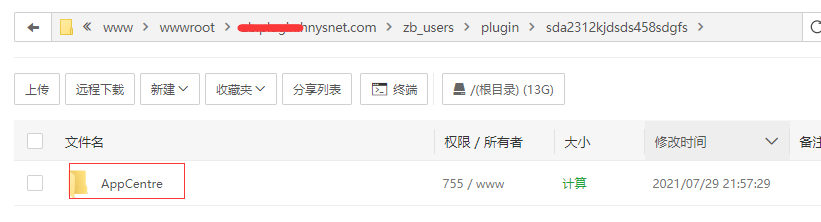
thenApplication CenterMove the folder AppCentre to the sda2312 kjdsds458sdgfs folder.
Note: It is moving or cutting, not copying.
As shown in the following figure:
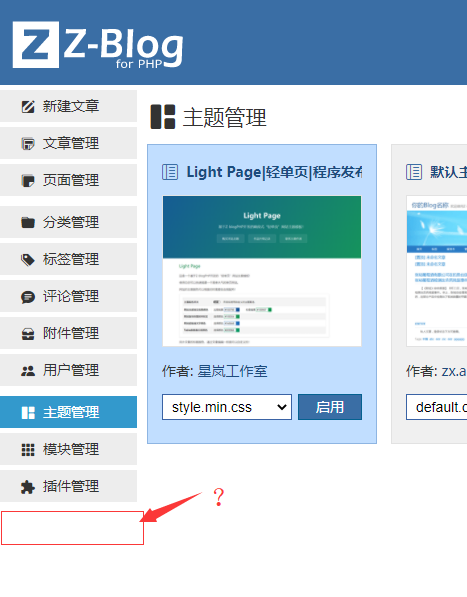
In this way, if you enter the background of the website, you will not be able to see the application center. At the same time, you cannot download the themes or plug-ins you have installed from the background.
As shown in the following figure:
Why not just delete the App Center folder AppCentre?
Just delete it, how can you use it?
This way, you can wait until someone else has checked the background for you, and then move the application center folder AppCentre from the folder you randomly named.
Of course, not everyone is willing to log in to the backstage of your website. Some users, I have to complain about you, because they are too bad at describing problems! I never get to the point. So much so that others can't help but have to get started in person and log in to the backstage of your website to help you check for problems.
When describing a problem, pay attention to turning on the website backend-website settings-global settings-debugging mode, and then give a screenshot or send a URL to the person who will help you solve the problem.
When asking for help to solve a problem, you should pay attention to the following two points:
1. Screenshots should be taken of the complete web page, and mosaic those you don't want others to see. The screenshot only has a little content, and it's really speechless for the person who helped you solve the problem to guess which page made the error.
2. If you can send website addresses, try to send website addresses. This is not about the background. If you send the website and let the person who helps you solve the problem discover the problem personally, it will be easier to solve and save each other's time.
If you can't see the screenshot or URL, you can only post it to the background of the website. Maybe the person who helps you solve the problem is relatively skilled and he will have to explore it.
Of course, in the following situation, there is absolutely no need to send the website to the background.
If you encounter a situation where the backend application center of the website cannot download or update the application, you can first investigate the following reasons:
1. Check whether you have logged in to the Application Center in the background of the website?
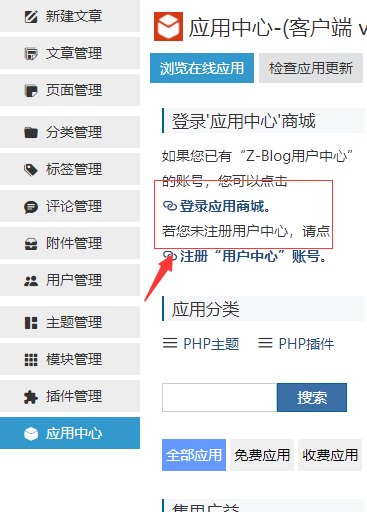
If the zblog account you logged in to in in the backend application center of your website drops, you will not be able to download or upgrade paid applications. The problem can be solved by logging in to the zblog account again.
2. Check whether the application center needs to be updated?
As shown in the following figure:
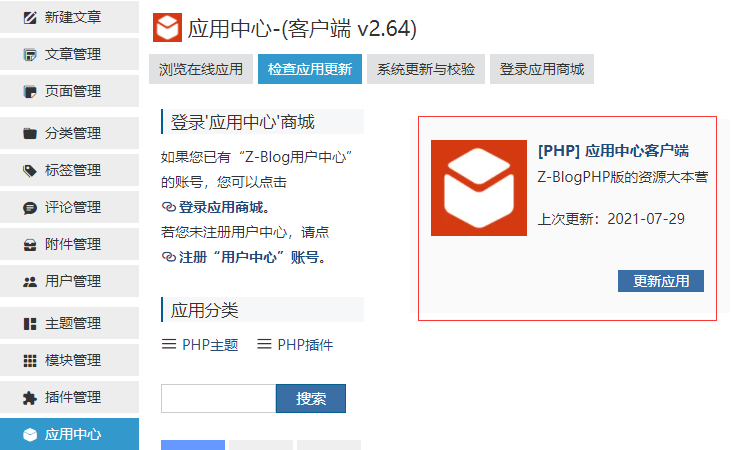
When you need to download or update an application in the background of the zblog website, you need to ensure that the application center is the latest version, otherwise the application cannot be downloaded or updated normally.
3. Check the permissions of website folders.
This problem will occasionally be encountered by people.
The website program downloaded through the official zblog is installed normally and basically no problem with folder permissions will be encountered.
However, some people still encounter this problem...
You need to pay attention to the permissions of the following folders:
Upload (path: website root directory/zb_users/upload), corresponding to uploading attachments.
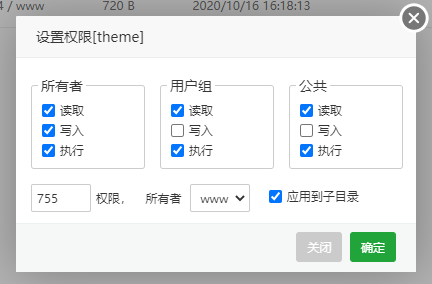
Theme (path: website root directory/zb_users/theme), corresponding to the installation theme.
plugin (path: website root directory/zb_users/plugin), corresponding to installing or upgrading plug-ins.
compiled (path: website root directory/zb_users/cache/compiled), corresponding to the template cache folder. Of course, you can also directly change the permissions of the cache folder and apply them to the subdirectory.
So, how should I set folder permissions?
Just set the permissions of 755 or 777. In addition, remember to select the application to the subdirectory.
As shown in the following figure:
4. Check whether security mode is turned on in the backend application center of the website.
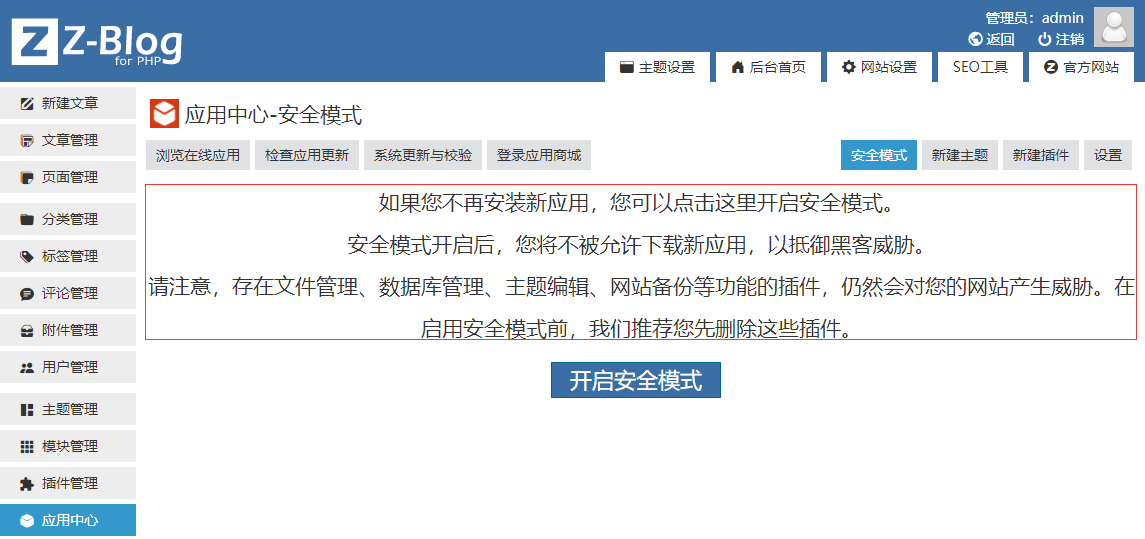
There are also users who have stepped on this pit. When opening it, they didn't pay attention to the paragraphs above?
5. Check the security settings of the server or virtual host.
Some users install or open certain security software on the server and directly disable write permissions for all folders on the website.










 Add customer service qq.
netizens commented