
Currently, most of Xinglan Studio's works are openExperience the website backgroundIn order to prevent users from confusing the background settings by mistake, I set them on the serverscheduled task, the database in the background of the experience website is reset every day. How is it achieved?
Here is an example of a pagoda:
1. First, back up the specified database;
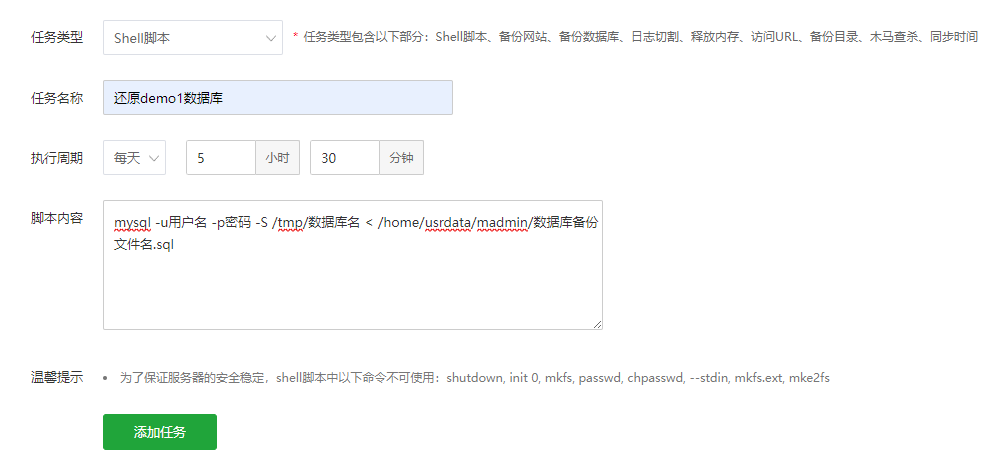
2. Add scheduled tasks to scheduled tasks;
3. Select the Shell script for the task type. The task name is "Restore a certain database", and I set the execution cycle to 5:30 every day.
4. For script content, you need to fill in shell commands. andrestore the databaseThe backup shell command is:
mysql -u用户名 -p密码 -S /tmp/数据库名 < /home/usrdata/madmin/数据库备份文件名.sql
5. Finally click Add Task.
So, I have many experience website backends. Are they really adding them one task at a time?
In fact, multiple shell commands can be added to the script content, and you just need to wrap the line.
As follows:
mysql -u用户名 -p密码 -S /tmp/数据库名 < /home/usrdata/madmin/数据库备份文件名.sqlmysql -u用户名 -p密码 -S /tmp/数据库名2 < /home/usrdata/madmin/数据库备份文件名2.sql
Of course, if you need to set up different execution cycles, you will need to add new scheduled tasks.











 Add customer service qq.
netizens commented
existing1People expressed their opinionsXinglan Studio
ReplyThe purpose of using this method is to allow users to make arbitrary settings without taking into account when experiencing the background of the website without having to worry about setting the website to be "broken"!