
 914466480

The words written in front
In ZBlogApplication CenterObject storage plug-ins are not uncommon, and I always adhere to the principle of "do not reinvent the wheel" - unless existing tools cannot really solve the pain points in actual use. When trying multiple plug-ins was still difficult to meet the needs of multiple scenarios, I decided to develop this multi-platform object cloud storage synchronization plug-in by myself, just to fill the gaps of existing tools and give webmasters a more efficient and worry-free experience.
Why develop this plug-in?
The core reason why I developed this plug-in stems from my deep perception of the pain points of using existing plug-ins:
Pain point 1: Multi-platform testing costs are high and has obvious functional limitations
Existing plug-ins either have simple functions and can only meet basic upload needs, or are "single-platform exclusive" design, with each plug-in only connecting to one cloud storage platform. For webmasters who need to test the stability and cost performance of different platforms, or plan multi-platform backup, they have to repeatedly purchase and install multiple plug-ins, which not only increases the cost of use, but also makes management cumbersome.
Pain point 2: Missing core practical function-local agent
This is a mainstream function that many webmasters urgently need in actual operations, but it is ignored by most plug-ins.
The core value of the local agent function
Perhaps some webmasters will ask: What is the use of local agents?
③ Unified brand image
After a website connects to object storage, the links to attachments (pictures, videos, etc.) are usually different from the root domain name of the website (for example, the root domain name of the website is www.finchui.com, and the custom domain name of the object storage is img.finchui.com). The most direct value of turning on a local proxy is that it can hide the custom domain name for object storage, allowing all resources in the entire station to be accessed through a unified root domain name, which not only ensures the unity of the brand image, but also improves the user access experience.
Ø Perfectly solve the problem of chain protection in Mini programs/APP
This function can solve the core pain point of webmasters when connecting with Mini programs or APP-many webmasters turn on hotlink protection for object storage in order to ensure resource security. When Mini programs/APPs directly access object storage links, because the request source is not in the hotlink protection allowed list, resources often cannot be loaded.
After turning on the local proxy, the Mini programs/apps actually visit the main domain name of your website. Resource requests will be forwarded to the object store through the server proxy. At this time, the source of the request received by the object store is the server domain name that has been added to the allow list. Resources can be returned normally, perfectly avoiding the problem of chain protection interception.
Unique picture preview solution
We provide a complete solution to the picture preview problem common to other plug-ins-an important feature that most similar plug-ins ignore at present.
I believe many webmasters have encountered this problem: after using other plug-ins to turn on object storage, uploading pictures on the article editing page, or uploading pictures in other locations that support image previewing, the preview often cannot be displayed normally. This is because it takes time to synchronize to the cloud after the image is uploaded. A 404 error will occur when accessing the cloud link before the synchronization is completed. The image must be reloaded to view it normally, which seriously affects editing efficiency and user experience.
💡Our smart fallback mechanism
The local agent function adopts a smart fallback strategy: When the cloud link is inaccessible (files have not been synchronized or synchronization fails), the agent will automatically detect and return the locally stored content to ensure that users can see the preview effect immediately without waiting for cloud synchronization to complete. Upload and preview, and the experience is smooth and perceptive.
Even if you don't turn on the local proxy, we will provide detailed Nginx/CDN pullback configuration methods in the document. By configuring the rule of fallback to local when configuring cloud 404, you can also completely avoid preview troubles and make the use process smoother.
Plug-in core functions
Support from six mainstream platforms
One plug-in handles all major cloud storage platforms, without having to purchase multiple plug-ins repeatedly:Tencent Cloud COS、Alibaba Cloud OSS、Qiniuyun Kodo、Huawei Cloud OBS、AWS S3、Google GCS
Ø Automatic sync - Newly uploaded files are automatically synchronized to the cloud without manual operations
③ Batch synchronization - Batch synchronization of historical attachments, allowing you to customize batch and interval time
③ Smart URL replacement - Attachment URLs in the article are replaced in batches, and theme custom fields are supported (such asthumbnail)
③ Local agent mode - Built-in proxy function, you can preview it immediately after uploading, and intelligently fallback to local areas
③ Customize CDN domain names - Support binding of custom domain names and CDN accelerated domain names
③ Picture processing parameters - Support image processing parameters (scaling, watermarking, etc.) for each platform
③ Platform independent storage - Switching platforms does not affect historical data, and each platform records synchronization status independently
③ Complete logging system - Detailed operation log, recording IP, synchronization status, file size, response time
③ Security protection - Complete CSRF protection and rights verification mechanism
Ø Range Request support - Support breakpoint resume and video drag playback
Plug-in Features and Advantages
1ˇ True multi-platform compatibility
Different from the "one plug-in for one platform" design on the market, this plug-in supports free switching between six major cloud storage platforms. Whether you want to test the stability and cost performance of different platforms, or need to implement a multi-platform backup strategy, you only need this plug-in. More importantly, the synchronization status of each platform is recorded independently, and switching platforms will not affect historical data, making your choices more flexible and free.
2ˇ Intelligent access strategy
There are two access modes: local proxy and direct connection to the cloud. You can flexibly choose according to your actual needs:
·Local agent model: Suitable for small and medium traffic sites, upload and preview, and the URL is simple and beautiful (/_oss/...). When the cloud does not exist, it automatically rolls back locally and provides a complete access log.
·Direct connection mode: Suitable for high-traffic sites, direct access to cloud URLs, zero PHP overhead, optimal performance, and make full use of CDN caching capabilities. Combined with the Nginx/CDN pullback rules, automatic pullback at 404 hours is also achieved.
3ˇ Intimate batch synchronization function
For sites that already have a large number of historical attachments, the plug-in provides complete batch synchronization functions. You can customize the number and interval of files synchronized in each batch to avoid excessive pressure on the server and make the migration process of a large number of files more smooth and controllable. Detailed logs during the synchronization process let you keep track of progress and status at any time.
4ˇ Complete log management
The plug-in has a complete logging system built in to record every detail of file upload, synchronization, and access. The log contains key information such as IP address, synchronization status, file size, and response time to help you quickly locate problems. Support viewing and automatic cleaning of expiration logs by date, making background management clearer and more orderly.
summary
Based on these core pain points and actual needs, this ZBlog multi-platform object cloud storage synchronization plug-in came into being. It is not only compatible with 6 mainstream cloud storage platforms such as Tencent Cloud COS and Alibaba Cloud OSS, but also integrates local agents, batch synchronization, custom CDN domain names, intelligent URL replacement and other webmaster essential functions. It truly realizes "one plug-in to handle the full scene object storage requirements", making website attachment hosting and static resource acceleration simpler and more controllable.
Whether you are a personal blogger or running a commercial website, no matter the size of your traffic, this plug-in can provide you with the most suitable cloud storage solution. Let's bid farewell to cumbersome multi-plug-in management and enjoy a more efficient and worry-free website operation experience!
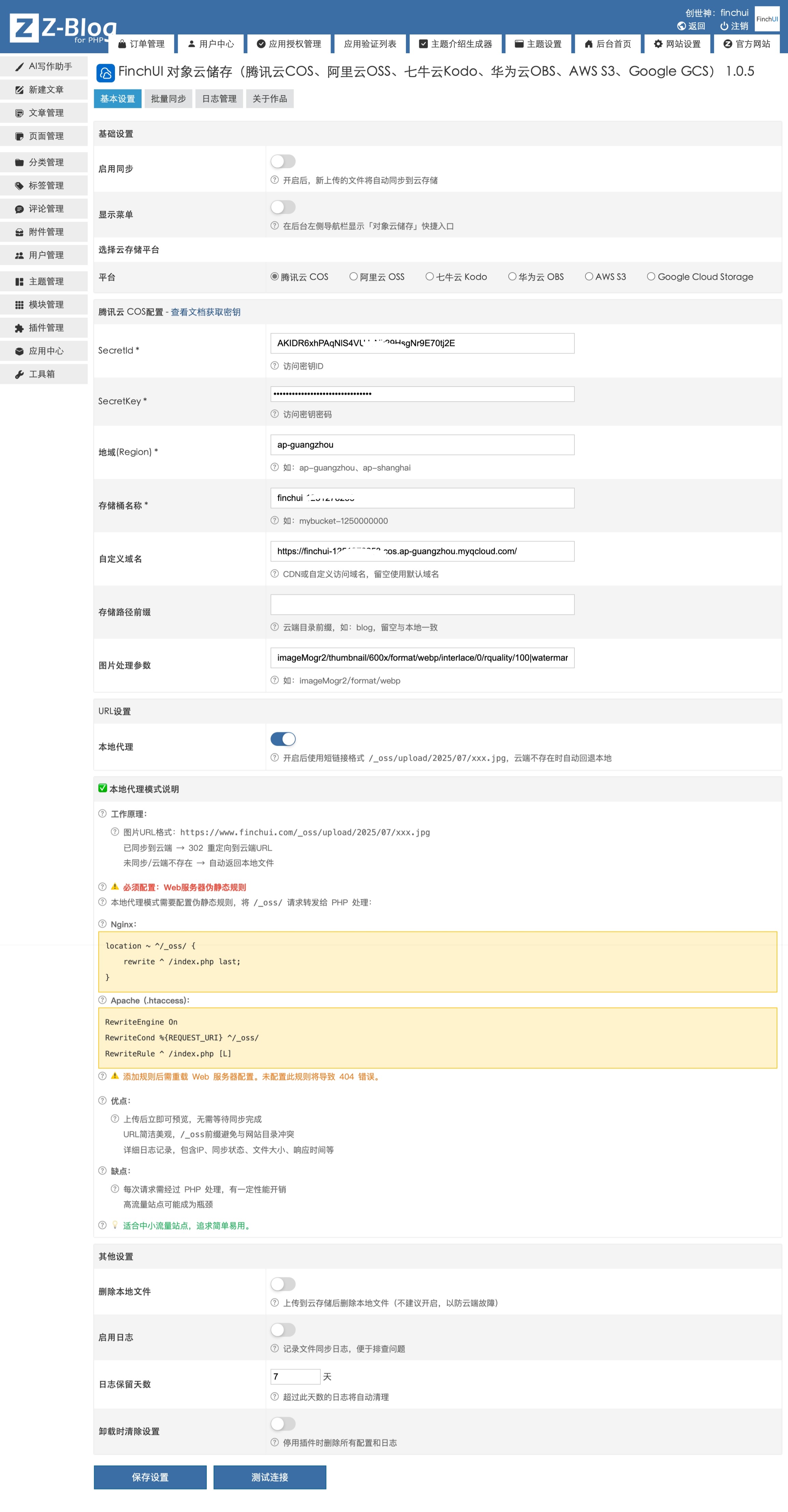
Plug-in configuration screenshots









 Add customer service qq.